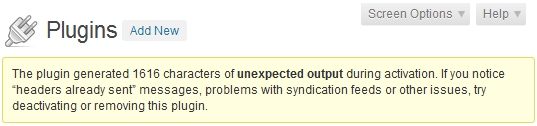
While developing a new WordPress plugin I ran into a common problem when the plugin was activated. The following message popped up:
The plugin generated 1616 characters of unexpected output during activation. If you notice “headers already sent” messages, problems with syndication feeds or other issues, try deactivating or removing this plugin.
The most common causes are:
1. A white space before or after the PHP opening or closing tags
2. A file encoded in UTF-8
3. Another issue when something is called at the wrong time, or a call that cannot be resolved without intervention
4. Using the WordPress add_option function. Switching to update_option instead can resolve the problem.
The first is the most common mistake for new programmers. Once the space is removed before or after the PHP opening and closing tags try deactivating and reactivating the plugin to see if the message is gone.
The second stumped me. I use XAMPP for local development. The files were encoded in UTF-8, the universal language encoding that is the standard, but the server threw errors. I finally converted the files to ANSI encoding, and the problem was fixed. Some web hosts also run software that generate this error, so it is best to encode the plugin in ANSI to avoid unexpected problems.
If the first two causes have been eliminated, and the problem persists then this issue needs to be tracked down and eliminated, otherwise it might cause problems. To save the error message to debug the problem the following code snippets can help:
If you have another method to save and display these error messages share them.
In my case was a ‘register_activation_hook( __FILE__, ‘wdp_itend_plugin_activate’ );’ that was writted in a wrong way.
I had a silly mistake on the activation file, one of my method inside a class was set to “public” instead of “public static”. So I got the error “The plugin generated 1593 characters of unexpected output…”. This might can help for someone. :)
Same problem occurred here and solved it giving static for function.
hello i have the same issue but i solved it .i used sublime its automatic remove extra space in your code then I have removed my ending php code ?> and its working thanks .
This is literally like finding a needle in a hay stack. Do I have to open every php file and search for extra spaces above or below the open and closing tag? Damn.
It is best practice to develop PHP applications using an IDE like Sublime Text, or PhpStorm, that will highlight and remove whitespace automatically on save.
Thanks Todd. The fact that we cannot SEE that unexpected output made this a pesky problem for me. Didn’t know about ob_get_contents() til viewing your post. Sure speeds up fixes to know the instigators.
remove unnecessary space from end of each and everyfile, it solved mine
Thank you, in my case save files UTF – 8 without boom and solved :D
You should add delete_option( ‘plugin_error’ );to the end of the snippet so that the option is deleted after it is displayed and you don’t end up thinking you’re continuing to have errors.
Sometimes, WP_DEBUG is set to true in wp-config.php file, just turn this false.
On a live site setting wp_debug to false is correct, however, this post is regarding an error that occurs during software development on a development site, where having wp_debug set to true is required, so these types of errors can be caught and corrected.
Hi, I was having the same issue with 7 character, i tried different options removing code one by one but the real solution was not either utf-8 or anyother.
the real problem was at the end of the plugin file after closing php. ?>
if you remove the closing php after each file the problem is solved,
similarly if you close the php and remove the [return][new lines][lin breaks] after the last php code then the problem is also solved
i suggest you removing extra linebreaks after the closing or last php code in the plugin file.
My case was number 2, I had the file with UTF-8 coding, I changed it and it worked. Thanks!
Hello, thanks for your tips. I have the same issue. When I try to save my files in ANSI and select US-ASCII since I haven’t the ANSI option. I’m using Zend Studio. This is the same? since doesn’t solve the problem but I’m almost sure this is the issue in that hosting because the plugin is working perfectly in others servers.